Saturday, December 27, 2008

My Computing World - Part 2

After my secondary school, while waiting for my exam result to either eligible for further study, I went and look for a short term job.

I found a job in a computer teaching lab, where we deployed a number of Singapore made 6800 based CPU called pico-M. It is a small "pc" with tiny keyboard much like the shrink-down Macbook keyboard. It is connected to either a composite monitor or TV like ZX81. We conduct tuitions and we do sell the so-called computer as well.

Besides, we had been assigned one unit of Sharp MZ-80K, a CP/M based PC with integrated monitor, disk drives, and tape recorder (imagine storing data on conventional music cassette).


My boss, the person in charge for the local tuition centre, demonstrated to me WordStar, running on CP/M-80, the 8080 version of CP/M, of which Sharp's MZ80K processor Z80 is fully compatible with the Intel 8080.

He was then told me that it is unfortunate as the centre is not having enough cash to buy the legal copy of WordStar, and at that point of time, there's virtually no one pirate Sharp MZ80K software as it is so rare in the market, in addition, the tuition centre does not want to run into risk of using pirated copy. The centre have only the demonstration copy which does not allow saving of files. Thus we need to keep retyping the same thing if we need to reproduce/print later after we created a document.

Then he asked if I can look at how WordStar functions, and come out with something that work without paying to our nose.

I accepted the challenge, and started looking at how WordStar functions and what is really important feature to us, and what is not relevant at all for our use.

I have been tempted to use Applesoft BASIC, which is my favourate programming tools at that point. But we do not have Apple II in the centre. Pico-m on the other hand, is a primitive PC, even less feature than ZX81 that I have, although with 1K RAM like ZX81, it does not have good enough programming tools besides general purpose BASIC, a strip-down BASIC interpreter, and machine code.

Furthermore, none of the Pico-m is able to connect to a printer. the only printer, an Epson dot-matrix, was connected to Sharp MZ80K running, besides WordStar, our accounting system.

It took me a good 2 weeks to finish a WordStar clone entirely in CP/M BASIC, with code less than 20K in source, I was able to mimic functionality of WordStar with all formatting features, editing features, printing and load/save document features, less on-screen menu (the habit I have developed since then not to pay attention to user interface (UI) in any of my programs written later until now).

Best of all, documents generated by my application is compatible with WordStar. This allows my boss to submit his reports electronically via modem from Melaka to Kuala Lumpur, without needing to print and send by mail. A breakthrough at that time where computers are island by itself.

Sad to say I have lost the source code after a few shifting in KL. I have printed the source code as a record of my achievement that I was capable of writing commercially viable application albeit it is not my original idea. Ideas are brought in from WordStar. But how I did it in 20K of BASIC code that make me feel good.

This exercise taught me how to handle strings, characters, and user interactions. Since then, I have been very interested in writing string manipulation stuff for the fun of it.

During my tenure with the tuition centre, I visited KL, the capital city of Malaysia, a few times. Mostly wondering around at Imbi Plaza, which is at that moment, the centre of all computer shops in town.

I bumped into a shop selling an Z80 development kit. The kit comes with a hexadecimal keypad, 1K RAM, and LED hexadecimal displays. Primary development language is Z80 assembly, and it has its own BASIC call tiny BASIC, against far inferior than ZX81.

I use the money I earned from the tuition centre and bought the development kit without knowing what I want to get out from there.

Friday, December 26, 2008

My Computing world


I was brought up in the pre-PC era.

It was 1979, one of buddy whose brother was a sales person attached to Sime Darby. At that point, Sime Darby is the distributor for Apple products, naturally, he bought one for himself.

It was an Apple II plus with 48K RAM, and dual 5 1/4 inch floppy drives, and of course a green monitor.


I used to visit my buddy during weekends, and his brother is generous to allow me to use his brand new Apple II plus.

Without coaching, no tips, except for manual in English. (I am a Chinese school boy, and I speak no English, write no English, and read no English, rather, English is alien to me).

My buddy is more an outdoor type, in most cases, I was hiding in his brother's room, and he joined my other friends outside his house playing all sorts of games.

From there on, I learned computing the hardest way. I was dealing with a complete unknown piece of equipment with language I cannot even understand.

Well, I got through when I poke around, refer back to the manuals provided, and slowly I was able to start writing some simple BASIC programs.

I showed my buddy, but he wasn't too keen on what I have done, instead he was more in tuned with outdoor activities.

I was then a consistent weekend visitor of his, every week I learned something.

My uncle bought a clone Apple II plus about 2 years later, and I was using quite a lot of stuff, including getting my homework done on computer where teachers always warned me that I should hand written my homework else I would not be able to write during my SPM. However, some of my teachers showed keen interest on the way I did my homework.

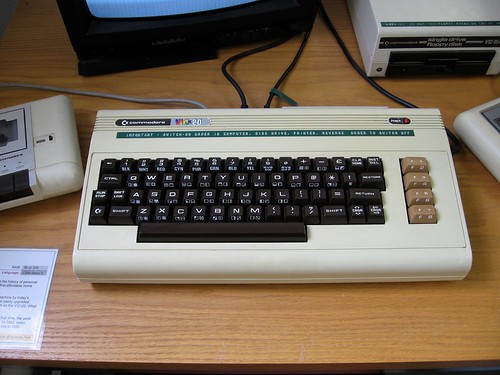
At the same time, my school was starting up a computer club, it was inspired by Mr. Tan, our Mathematics teacher who owned a Commodore VIC-20 besides Apple II clone.


Mr Tan guided the club members, free of charge, what the computer can do for us. I do not recall if there anyone who are keen on the subject except me. I went to his house a couple of time looking at his set up.

He was the one who introduced modem to me. showed me what the modem can do. Although he can only communicate with his other friend in KL who has the same modem, and long distance call is expensive.

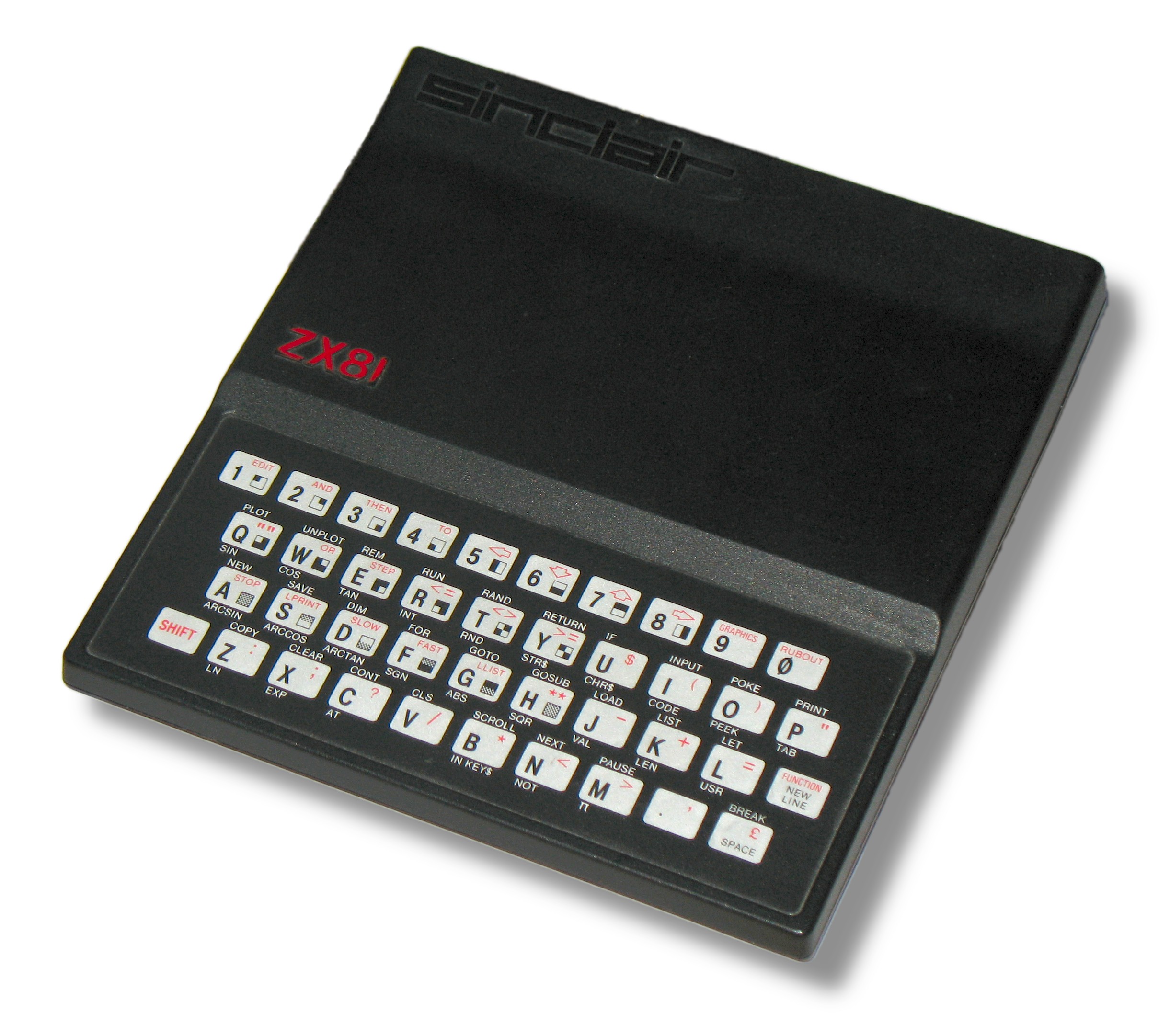
During that time, one of my uncle, who was studying in London, sent me a Sinclair ZX81.


Well, I was kind of sleeping with this little "door-stopper", look like one, isn't it?

Since this little guy needs to connect to a TV, I have to wait until everyone in the family go sleep, and I sneaked up late at night just to play around with this little wonder.

The first proper programming book I ever had, fresh from UK at that time, titled "Byteing Deeper into your ZX81"

Since 1980, I started to read "BYTE" magazine, a magazine which is my only source of computing knowledge, and was hard to get. I need to save some money each month, and went to book store often to book a copy.


Wednesday, December 24, 2008

Groupware

I was looking for a decent groupware capable of supporting both web access and conventional clients.

The crucial part is to allow group calendaring, preferably integrate with
SugarCRM as the CRM for the Enterprise;
Asterisk IP PBX as the Enterprise phone system;
IMAP mail server;
caldav if possible else at least ical support.
synchronising with mobile/handheld devices via Funambol


Better still if it supports Knowledgetree document management system.

We have thus far deployed Asterisk IP PBX system, IMAP server. SugarCRM is in the pipeline open to those who need to interact with the outside world. We do have Knowledgetree in 3 offices, acting as document repository with tight tracking on what goes in and out.

We are yet to implement caldav, of which I have tried the Apple ical server, work with limited success. The Apple ical server works well with Apple ical client, but not Thunderbird with Lightning as add on, or Sunbird.

Forgot to mention that Thunderbird will be replacing Outlook and Outlook Express from all desks, eliminating one important component from Microsoft.

Open Office will eventually be replacing MS Office in the mid term.

The effort is to streamline the cost of ownership and avoid cost associated with frequent software upgrade that forcing us to refresh our hardware.

In deed, most of the applications will eventually be moving to web based, eliminating the need to support individual stations as there shall be no business information stored in the local storage in time to come.

Back to groupware:
I have spent a great deal of time looking for a suitable candidate. Zimbra was top of the list. It looks promising but its hungry of resources making it less likely candidate for our case.

We need something decent, fast, lean and mean. We do not need bells and whistles that ended redundant.

Alternatively, Scalix seems to be a viable choice but I still prefer Scalable Open Groupware based on its features.

Others such as Citadel, egroupware, phppojekt (my favourate), Open-Xchange, even OBM, have been evaluated. Some fall short on the web interface, some do not support ical/icaldav, some insists that mail server to be provided as bundle instead of using the existing mail server, this poses problem for us migrating some 400 users' mail settings, plus 70% of them with IMAP, means transporting mailboxes from one server to another server become almost impossible without significant downtime.

to be continued....


Sunday, December 21, 2008

How to make money from the Internet

A lot of people have been asking me how to make money from the Internet.

Well, there are many ways, but one must realise that traffic to your website/e-commerce site does not really mean making money.

In actual fact, doing business on the Internet is just like opening a physical shop somewhere.

You need to have product(s)/service(s) to sell, then

you need to have a good location where your visibility is high, i.e. having a shop in shopping mall instead of at a remote corner somewhere unknown.

You also need to know the marketing and selling skill in order to move your products/services.

Frankly speaking, the although the medium shifted from physical shop front to virtual shop front, everything else remain unchanged.

Lastly, will your potential customer trust you that you will deliver once collected their money. Unlike in physical shop, customer feel better coz they know where to look for you, although there may be a risk that you will run away with their money, however, in most cases, you may be collecting goods right at the moment you pay, or you can collect later not worrying that the shop keeper will run away.

Thus, a successful internet shop front is all about customer confidence. Others aside, if your potential customer is not comfortable with you, no matter what you do to promo will not lead to any significant result.

Many internet shops failed simply because they cannot build customer confidence, not because of other factors.

Should you want to run an Internet business, please look into building customer confidence as the highest priority, all the others will fit nicely then.

Tuesday, December 16, 2008

Virtual Box and Ubuntu

I have just installed Ubuntu 8.10 Desktop and 8.04 Server with GNOME Desktop on my Virtual Box. Beside some slight glitches, yes, there are some problem with DHCP via MAC OSX host Airport, that I need to manually fix IP, DNS server, and gateway than obtaining from DHCP server. However, via Ethernet connection it seems ok with DHCP.

A closer look at the DHCP server revealed that Ubuntu client did make a DHCP request, and DHCP server did response, but Ubuntu client is not able to receive reply from DHCP server, and this is only happening when network is configured via Airport wireless interface.

It seems to me some kind of firewall or filtering is in place, but I do not know where, it does not seems to be on Ubuntu, since Ethernet connection is OK.

On Airport Wireless interface, windows XP client successfully getting the DHCP information.

Thus, I can safely suspect that it may be VirtualBox/Ubuntu combination that is causing the problem.

Leave the problem aside, Ubuntu did run faster on my Macbook than many other PCs,

Will try to find out what goes wrong and record it here.

Saturday, December 13, 2008

Virtual Box - The Open Source Virtualization

I have been using Parallels Desktop 3.0 and recently upgraded to 4.0 on my Macbook. The speed is merely acceptable that restricts it uses only when necessary.

This defeat the purpose of getting a Macbook as I need a workhorse to be able to run multiple OS, and OSX is my preferred platform for my daily work.

Recently, I discovered Virtual Box from Sun Microsystem, an Open Source virtualization which I personally feel much better than VMWare and Parallels both in terms of performance and ease of use.

Not to mention it is free.

I have since tested installed Windows XP version 2002, works fine except isight and bluetooth built in is not functioning under Windows, as the drivers are buried inside the Apple Bootcamp app. I am yet to retrieve drivers from Bootcamp as yet.

Overall, I am very happy with VirtualBox, it gives me an opportunity to have multiple OSs on the same Macbook and run pretty well and fast too.

On Windows XP, it is faster than most Core 2 Duo desktop PCs.

If you are need to run another OS on your PC, VirtualBox should meet most of your requirement.

Google VirtualBox to download and install, try yourself, you will know what I mean.

Hello World!

This is the first post of my tech blog, of which I will post technology related postings.

Have fun!